
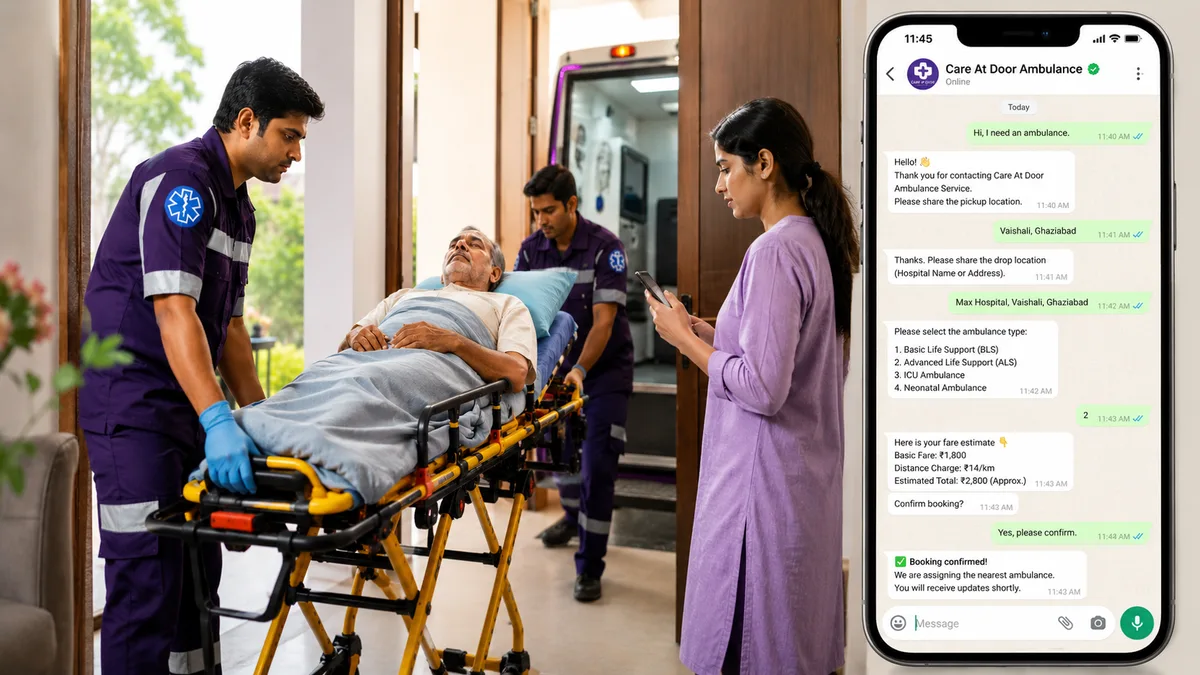
How to Book an Ambulance on WhatsApp: A Step-by-Step Guide
A simple guide to booking an ambulance quickly, understanding fare estimates, and choosing the right ambulance during a medical emergency.
A medical emergency can happen without warning. When someone suddenly becomes seriously ill or injured, every minute matters. During these situations, finding an ambulance quickly is often the first concern. Many people also want to know how long it will take to arrive, what type of ambulance they need, and how much it will cost.
WhatsApp ambulance booking makes this process simpler by allowing you to request an ambulance from your phone in just a few steps. This guide explains how WhatsApp ambulance booking works, what information you'll need to provide, and what to expect after placing your request.
Why Book an Ambulance Through WhatsApp?
WhatsApp is one of the most widely used messaging apps, making it a familiar and convenient option during stressful situations. Instead of making multiple phone calls, you can share your details through a chat and receive updates as your booking progresses.
Some of the advantages include:
- Easy booking using a familiar app
- Quick sharing of pickup and destination locations
- Ability to select the required ambulance type
- Transparent fare estimate before confirmation
- Real-time booking updates
- Simple communication without long phone conversations
When Should You Book an Ambulance?
An ambulance should be considered whenever a person requires urgent medical attention or safe medical transportation.
Common situations include:
- Chest pain or suspected heart attack
- Difficulty breathing
- Stroke symptoms such as sudden weakness or difficulty speaking
- Serious road or workplace accidents
- Unconsciousness
- Severe bleeding
- High-risk patient transfers between hospitals
- Transportation for critically ill patients requiring medical monitoring
If you believe someone's life may be in immediate danger, seek emergency medical assistance without delay.
Step-by-Step Guide to Booking an Ambulance on WhatsApp
Step 1: Start the WhatsApp Conversation
Open the WhatsApp chat for the ambulance service and send a message requesting an ambulance.
Step 2: Share the Pickup Location
Provide the complete pickup address or share your live location through WhatsApp to help the nearest ambulance reach you accurately.
Step 3: Share the Destination
Enter the hospital name or complete drop location where the patient needs to be transported.
Step 4: Select the Ambulance Type
Based on the patient's condition, choose the most appropriate ambulance.
Common options may include:
- Basic Life Support (BLS)
- Advanced Life Support (ALS)
- ICU Ambulance
- Neonatal Ambulance (where available)
If you are unsure which ambulance is suitable, explain the patient's condition so trained professionals can guide you.
Step 5: Review the Fare Estimate
After receiving the required information, you will be shown an estimated fare before confirming the booking. This helps you understand the expected transportation cost in advance.
Step 6: Confirm Your Booking
Once you are satisfied with the details and fare estimate, confirm the booking through WhatsApp.
Step 7: Ambulance Assignment
After confirmation, the service begins assigning the nearest available ambulance. You will receive updates as the booking progresses.
Some services may automatically cancel the booking if an ambulance cannot be assigned within a defined time, allowing you to make alternative arrangements without unnecessary waiting.
What Information Should You Keep Ready?
Having the following details available can help speed up the booking process:
- Patient's pickup location
- Hospital or destination address
- Patient's age (if relevant)
- Brief description of the medical condition
- Contact number of the person accompanying the patient
Providing accurate information helps ensure the appropriate ambulance is dispatched.
How Is the Ambulance Fare Calculated?
The estimated fare can vary depending on several factors, including:
- Pickup and destination distance
- Type of ambulance selected
- Medical equipment required
- Medical staff accompanying the patient
- Local service area
Reviewing the estimate before confirming the booking helps avoid uncertainty during an emergency.
Tips for Faster Ambulance Arrival
While waiting for the ambulance:
- Keep your phone available for updates or calls.
- Share your live location if possible.
- Ensure someone is present to guide the ambulance to the patient.
- Keep the entrance clear and accessible.
- Gather any important medical records or current medications if readily available.
Professional Ambulance Booking Through WhatsApp
Care At Door offers WhatsApp ambulance booking to make emergency transportation simpler. You can share your pickup and destination locations, choose the required ambulance type, receive a fare estimate before confirmation, and stay informed with booking updates as the nearest available ambulance is assigned.
Frequently Asked Questions
Yes. You can book an ambulance for a family member, friend, neighbour, or anyone who requires medical transportation. Be prepared to provide accurate pickup and patient details.
Availability depends on the service provider. Many professional ambulance services operate 24 hours a day.
Many WhatsApp ambulance booking services provide an estimated fare before you confirm the request.
Depending on the provider's process, you may be informed immediately if an ambulance cannot be assigned, allowing you to explore other options without unnecessary delay.
Yes, if multiple ambulance types are available, you can usually select the option that best matches the patient's medical needs.
Share this article
Get Professional Ambulance Assistance
Book a verified ambulance quickly through WhatsApp with transparent fare estimates and real-time booking updates.
Book Nowⓘ Medical Disclaimer
This article is for educational purposes only. It should not replace professional medical advice, diagnosis, or treatment. If you have symptoms or a medical emergency, consult a qualified healthcare professional.